Your data and memberships
Download your personal data and leave organisations you no longer help run.
Your account keeps track of the events you've registered for and the organisations you help run. From Account settings you can see all of it, download a copy of your personal data, and step away from organisations you no longer help with.
Your registrationsLink to this section
The Registrations tab lists the events you registered for while signed in, in three sections:
- Upcoming: events that haven't ended yet, soonest first.
- Past: events that have ended, most recent first.
- Certificates: certificates from events where you gave feedback. Choose View certificate to download one.
Each registration shows its status (Confirmed, Waitlisted, Waiting for approval, Declined or Checked in) and buttons such as View ticket, Event page, Manage team, Project and Cancel registration, depending on the event. Long lists are split into pages of 50.
Registrations you made as a guest, without signing in, aren't listed here, even if you used the same email address. Use the links in their confirmation emails instead.
See Your ticket for what you can do with each ticket.
Download your dataLink to this section
At the bottom of the Registrations tab, Download my data gives you a copy of what Yuyu holds about you, as a JSON file you can open in any text editor or import elsewhere.
- Open Account settings → Registrations.
- Scroll to Download my data and choose Download my data.
- The file downloads straight away. Yuyu shows "Your download has started."
The file contains:
- your profile: name, email, whether it's verified, when you joined, whether two-step verification is on, and which sign-in methods are linked
- your organisation memberships and roles
- your registrations, with their status, check-in time, team, and your answers to registration questions
- hackathon projects from your registrations
- feedback you gave while matched to your registration (for certificates)
- your event co-organiser roles and permissions
Passwords, security and recovery codes, and ticket or other private links are never included. Anonymous feedback isn't linked to you, so it isn't in the file either.
Your organisationsLink to this section
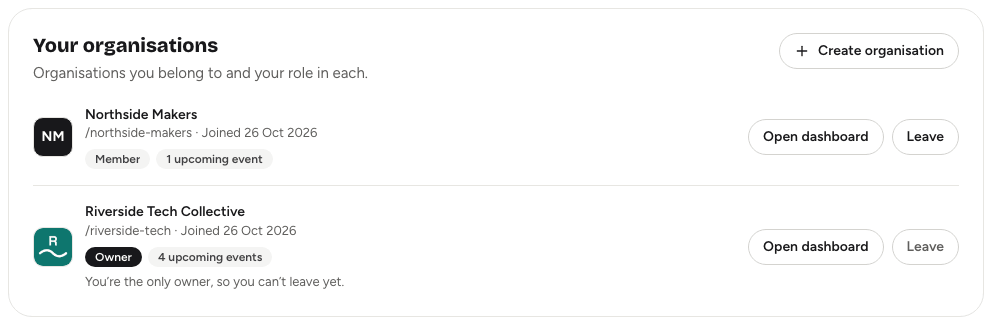
The Organisations tab has three cards:
- Your organisations: each organisation you belong to, its web address, when you joined, your role, and how many upcoming events it has. Open dashboard takes you to it. Create organisation starts a new one.
- Event co-organiser roles: events and series where an organisation gave you co-organiser permissions, with the permissions you hold. Open event takes you to that event's dashboard.
- Pending invitations: co-organiser invitations sent to your email address that you haven't accepted yet. Accept them from the link in the invitation email. You need a verified email to see this list.
Leave an organisationLink to this section
- Open Account settings → Organisations.
- Next to the organisation, choose Leave.
- Read the confirmation and choose Leave organisation.
You lose access to the organisation's dashboard, events and members straight away. To come back, an owner or admin has to invite you again. Leaving only removes your own membership: the organisation, its events and everyone else are untouched. Any event co-organiser roles you hold are kept, so you still reach those events.
Deleting your accountLink to this section
You can't delete your account from the app yet. To have it deleted, contact the person who runs your Yuyu instance. Downloading your data first is a good idea.