Event co-organisers
Give someone outside your organisation exact permissions on one event.
A co-organiser is someone who helps with one event without joining your organisation. You choose exactly what they can do: a door volunteer might only get Check-in, while a partner running sign-ups gets Registrations. They see only the events they're invited to, never your other events, members or settings.
Invite a co-organiserLink to this section
- Open the event and choose the Settings tab.
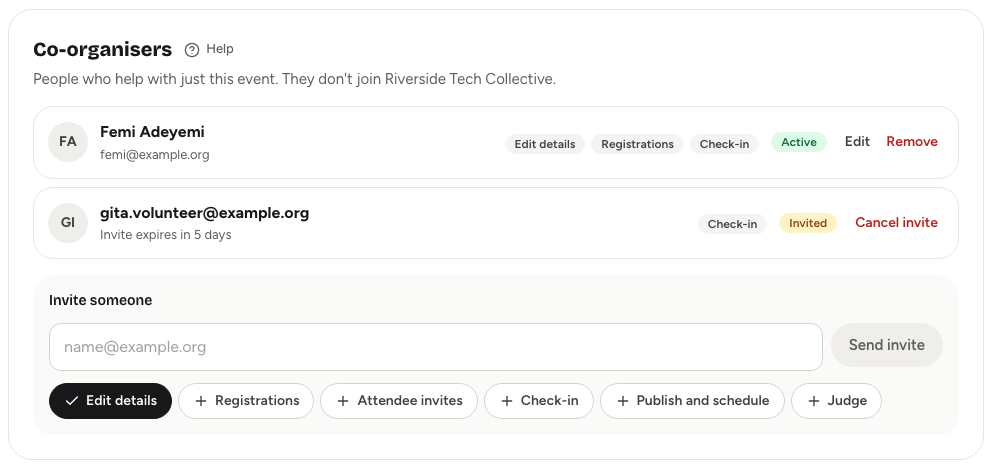
- In the Co-organisers card, under Invite someone, enter their email address.
- Choose what they can do by turning permissions on or off. Edit details is on to start with; pick at least one.
- Choose Send invite.
Yuyu emails them a link to accept. The invite shows in the list as Invited, with how long it has left. Invites expire after 7 days.
To accept, the person opens the link, signs in (or creates an account) with the same email address you invited, and chooses Accept invite. They land on the event's dashboard. If they sign in with a different address, the invite shows as unavailable.
The permissionsLink to this section
| Permission | What it lets them do |
|---|---|
| Edit details | Edit the event page content in Event page → Page & programme: colour, sections, highlights, speakers, sponsors, resources and FAQs. Set up custom check-in lists. Preview the page while it's a draft. |
| Registrations | Work the guest list in Guests: approve, decline, give waitlist places, add, edit and remove guests, and export CSVs. See the registration numbers and Analytics. |
| Attendee invites | Manage the invite list in Guests → Invites. |
| Check-in | Open the check-in desk: scan tickets, search for guests, check people in and out of lists, work offline and print badges. |
| Publish and schedule | Build the programme: sessions, tracks and live delays. Preview the page while it's a draft. |
| Judge | Score hackathon projects in the judging workspace. See Judges, rubric and scoring. |
Permissions are exact: one never includes another. Someone with only Check-in can't see the guest list in Guests, and someone with only Registrations can't open the check-in desk.
A co-organiser whose only permission is Judge sees just the judging workspace for that event, and nothing else on the dashboard.
Change or remove accessLink to this section
In the Co-organisers card, each person who has accepted shows as Active with their permissions.
- To change what they can do, choose Edit, turn permissions on or off, and choose Save permissions.
- To take away their access, choose Remove, then Remove access. They lose access to the event straight away.
- To withdraw an invite that hasn't been accepted, choose Cancel invite. The link in their email stops working.
What co-organisers seeLink to this section
When a co-organiser opens your organisation in Yuyu, they see only a list of the events they help with. Each event's dashboard shows the tabs and buttons their permissions allow, with a short note where they don't have permission.
Their co-organiser roles, and any invites waiting for them, are also listed in Account → Organisations.
Good to knowLink to this section
- To re-invite someone whose invite expired, send a new invite from the same card.
- If an organisation member also co-organises an event, they get the co-organiser permissions on that event on top of their member role.
- Removing someone from your organisation doesn't remove their co-organiser access. Remove it here as well if needed.
- See Roles and permissions for how co-organisers compare with members and admins.