Assigning judges and tracking progress
Spread projects across judges and spot reviews that need attention.
With a handful of projects, every judge can review everything. With dozens, you'll want to share the work out so each project gets enough reviews without anyone drowning. This article covers assigning judges, by hand or automatically, and the Progress section that shows where judging stands.
Switching to assigned projectsLink to this section
By default, All judges see all submissions. To give each judge only some projects, go to Judging → Setup, choose Only assigned submissions under Which projects judges see, and choose Save settings.
Assigning judges automatically (below) makes this switch for you.
Assigning judges by handLink to this section
- Open Judging → Submissions.
- Choose ⋯ on a submitted project, then Assign judges.
- Tick the judges who should review it, then choose Done.
With Only assigned submissions on, each submitted project lists its judges, or "none assigned". Judges registered on a project can't be assigned to it.
Assigning judges automaticallyLink to this section
Yuyu can share the submitted projects out so that each one gets the same number of judges and everyone's load stays even.
- Open Judging → Progress and choose Assign judges automatically.
- Set Judges per project, from 1 to 20. It starts at your target (3 if you haven't set one).
- Under Current assignments, choose Keep current assignments to only fill the gaps, or Start over to share everything out again.
- Under Who judges, tick the judges to use. Invited judges are ticked already. Owners and admins only judge if you tick them.
- Choose Preview.
- Check the preview, then choose Apply assignment.
The preview changes nothing. It shows each judge's assignments now, the change, and the total after, and lists any projects that can't reach the number because there aren't enough judges without a conflict of interest.
When you apply:
- Judges switch to seeing only their assigned projects.
- Start over keeps any assignment where the judge has already saved scores, so nobody loses work in progress.
- If a judge already started scoring a project they weren't assigned, it becomes their assignment.
- The number you chose becomes the event's target for Progress.
Running it again with nothing changed gives the same result. If anything changes between your preview and applying, Yuyu asks you to preview again.
Assignments can't change once judging is closed.
Tracking progressLink to this section
Judging → Progress shows how close judging is to done.
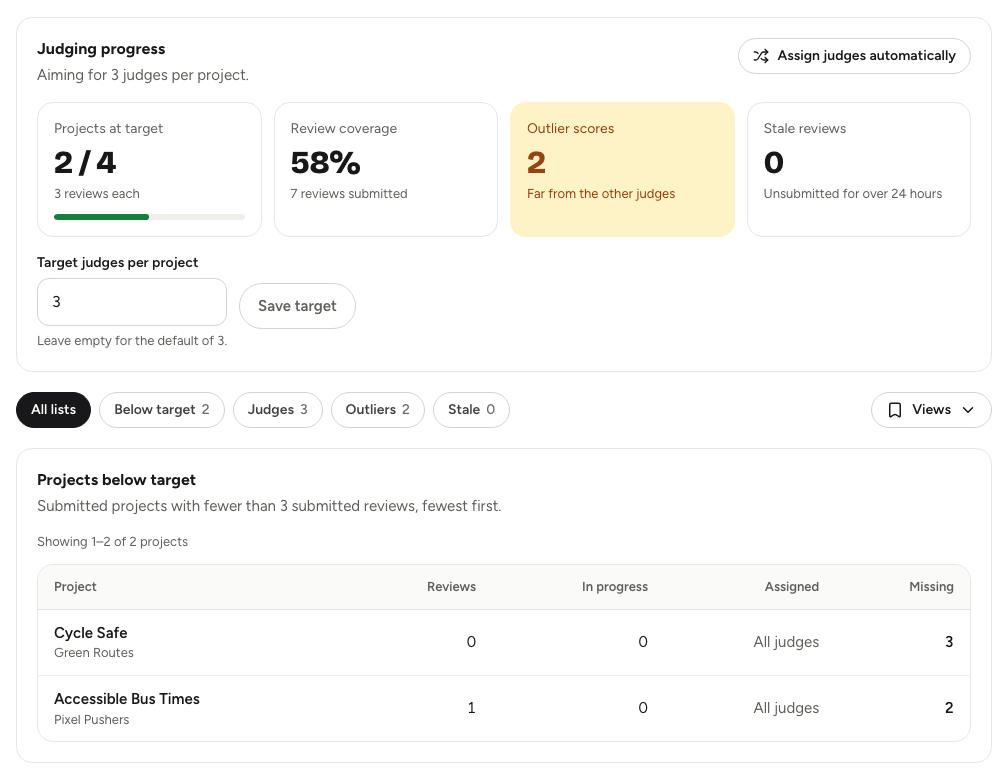
The summary at the top shows:
- Projects at target: how many projects have enough submitted reviews.
- Review coverage: submitted reviews as a share of what you're aiming for.
- Outlier scores and Stale reviews: how many need a look (see below).
Set Target judges per project to the number of reviews you want for each project, between 1 and 20, and choose Save target. Leave it empty for the default of 3.
Use the chips to show All lists or just one of them:
- Below target: submitted projects with fewer reviews than the target, fewest first. Send judges here first.
- Judges: each judge's assigned projects, how many they've started and submitted, and their completion, lowest first.
- Outliers: a judge whose score for a project is far from the other judges' average (more than two standard deviations), or, when only two judges reviewed it, scores more than 25 points apart. It's worth a second look, but nothing changes automatically.
- Stale: reviews with saved scores that haven't been submitted for over 24 hours. Unsubmitted reviews don't count towards the results, so nudge those judges.
Each list shows 25 rows to a page. Only submitted reviews from people who can still judge, and who aren't registered on the project, count.
Good to knowLink to this section
- The Views menu saves the list you're looking at, such as Below target. See Filters and saved views.
- To see each judge's scores and comments for a project, use Judges' reviews on the Submissions section. See Submissions and the gallery.
- Before closing judging, check Below target and Stale are empty, or that you're happy with what's there. See Judges, rubric and scoring.