Recurring series
Weekly meetups and other repeating events, each date with its own guest list.
A recurring series is for an event that repeats on a schedule, such as a weekly meetup, a monthly book club or fortnightly office hours. You set it up once, and Yuyu creates each date for you. Every date has its own page and its own guest list, so people sign up for the dates they can make.
For a one-off event, or one that repeats only now and then, use a normal event and clone it instead. Series are for individual sign-ups only; team registration, hackathon submissions and judging need a normal event.
Create a seriesLink to this section
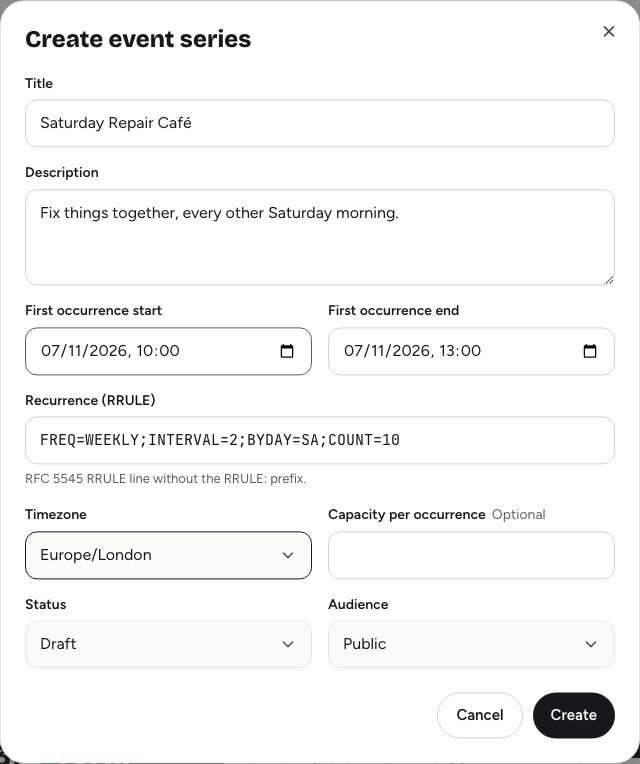
- Open your organisation's dashboard and choose New series.
- Enter a Title and, if you like, a Description.
- Set the First occurrence start and First occurrence end. Every date lasts as long as this first one.
- Enter the Recurrence (RRULE): the repeat pattern (see below).
- Choose the Timezone, and a Capacity per occurrence if you want to limit places on each date.
- Choose a Status (Draft or Published) and an Audience.
- Choose Create.
Yuyu opens the series page, with the dates it created listed under Upcoming instances.
Writing the repeat patternLink to this section
The Recurrence (RRULE) field uses a standard calendar format. Type the rule without RRULE: at the start. Some common patterns:
| Pattern | Rule |
|---|---|
| Every week, 12 times | FREQ=WEEKLY;COUNT=12 |
| Every two weeks | FREQ=WEEKLY;INTERVAL=2 |
| Every month on the same date | FREQ=MONTHLY |
| Every day, 5 times | FREQ=DAILY;COUNT=5 |
Without a day in the rule, the series repeats on the same day and time as the first occurrence, which is usually what you want. Use COUNT= to stop after a number of dates, or UNTIL= with a date to stop on a day.
Yuyu creates dates from now onwards, up to 48 of them within the next year. Dates before today are skipped.
Status and audienceLink to this section
- Status: Draft keeps the series to your team. Published opens every date for sign-ups.
- Audience: Public lists the series on your organisation page and Discover; Hidden link only works for people with the link; Approval required means you approve each sign-up; Invite only limits it to people on the series' invite list.
These apply to every date in the series.
Manage a seriesLink to this section
Open a series from Series on your organisation's dashboard. The series page has:
- Series details: change the title, description, time zone, capacity per occurrence, status and audience, then choose Save.
- Invites: the email list for invite-only series. Everyone on it can sign up for any date.
- Schedule: a simple programme shared by the dates.
- Upcoming instances: each date, with View event to open its public page. Share these links for people to sign up.
- Reports: a PDF report for each date once it has finished.
- Attendees (first upcoming occurrence): the guest list for the first date in the list, where you can approve, decline and manage guests.
Delete a seriesLink to this section
- Open the series page.
- Under Series details, choose Delete series.
- Choose Delete series again to confirm.
Good to knowLink to this section
- Capacity applies to each date separately, and it can't be set lower than the number of people already confirmed on any date.
- Guests register for one date at a time and get a ticket for that date.
- Each date is worked out from the first occurrence's exact moment. In time zones that change their clocks for summer time, dates after the change can show an hour earlier or later. Check the list of dates after creating the series.