Creating an organisation
Start the workspace your events live in.
An organisation is the home for your club, group or team on Yuyu. Every event, recurring series, member and setting belongs to one. Create one when you're ready to run your first event, or when a new group needs its own public page and team.
Anyone with a Yuyu account can create an organisation, and you can belong to as many as you like.
Create your organisationLink to this section
- Choose New organisation in the sidebar. If you don't belong to an organisation yet, you can also choose Create organisation on your dashboard home.
- Enter a Name. Guests see it on your public page and at the top of every event page.
- Enter a Web address. Yuyu checks it as you type and tells you whether it's available.
- Add a Description if you like: a sentence or two about your community.
- Add a Logo if you have one: a JPEG, PNG or WebP image up to 5 MB.
- Choose Create organisation.
Yuyu opens your organisation's public page. Choose Dashboard at the top to start setting things up.
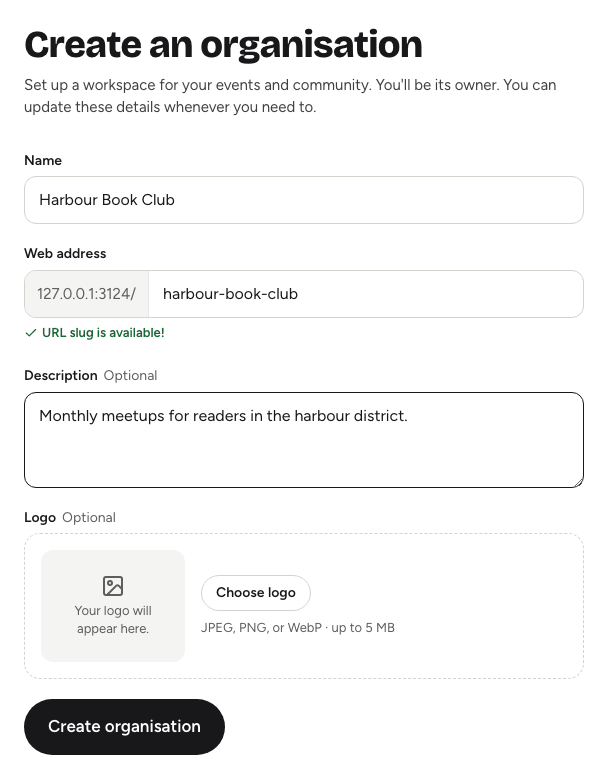
Choosing a web addressLink to this section
The web address is the last part of your public page's link, for example /riverside-coders. It's also the start of every event link, such as /riverside-coders/spring-meetup.
- Use lowercase letters, numbers and single hyphens. Spaces turn into hyphens as you type.
- It must be 2 to 64 characters long.
- Some words are reserved for Yuyu's own pages, such as
dashboard,discover,helpandsettings, so they show as taken.
You're the ownerLink to this section
The person who creates an organisation becomes its Owner. The owner can do everything, including changing other people's roles, managing API access and deleting the organisation. See Roles and permissions for what each role can do.
An organisation has one owner, and ownership can't be handed to someone else in the app. If someone else should run things day to day, make them an admin.
What to do nextLink to this section
A brand-new organisation's dashboard shows a short checklist:
- Add your logo and a short description. They appear on your public page and every event page.
- Create your first event, or start a series for a weekly or monthly meetup. See Creating an event and Recurring series.
- Invite your team. See Inviting and managing members.
- Share your public page. It's one link that always lists what's coming up.
Good to knowLink to this section
- You need a verified email address to create events and series. Creating the organisation itself doesn't need it, but you'll be asked to verify before your first event.
- If Yuyu says there have been too many creation attempts, wait a while and try again.
- Your public page lists only events that are live and open to everyone. Drafts, link-only and invite-only events never appear there. See Publishing and visibility.