Running late: live delays
Tell guests about delays on the day without editing every session.
Talks overrun and lunch takes longer than planned. Instead of editing every later session by hand, add a delay to the session that's running over: Yuyu moves everything after it in the same track, and the public programme shows the new times.
How delays workLink to this section
Each session keeps its planned times, and Yuyu works out live times from the delays you add:
- A delay on a session moves every later session in the same track back by that many minutes. The session itself keeps its times.
- Delays add up. A 10-minute delay on the morning keynote and a 5-minute delay on the next talk put everything after that talk 15 minutes behind.
- Other tracks aren't affected. If the main hall runs late, the workshop room stays on time.
- Planned times never change, so you can remove a delay at any point and the programme goes straight back.
Adding a delayLink to this section
- Open the event, choose the Event page tab, then Page & programme, and choose Open schedule.
- Find the session that's running over in its track.
- In Delay from this session (min), type how many minutes late it will finish, for example 15.
- Click or tap outside the box. The delay saves as soon as you leave it.
Every later session in that track now shows two lines: Planned, with the original times, and Live, with the new times and how far behind it is, for example "(15 min behind)".
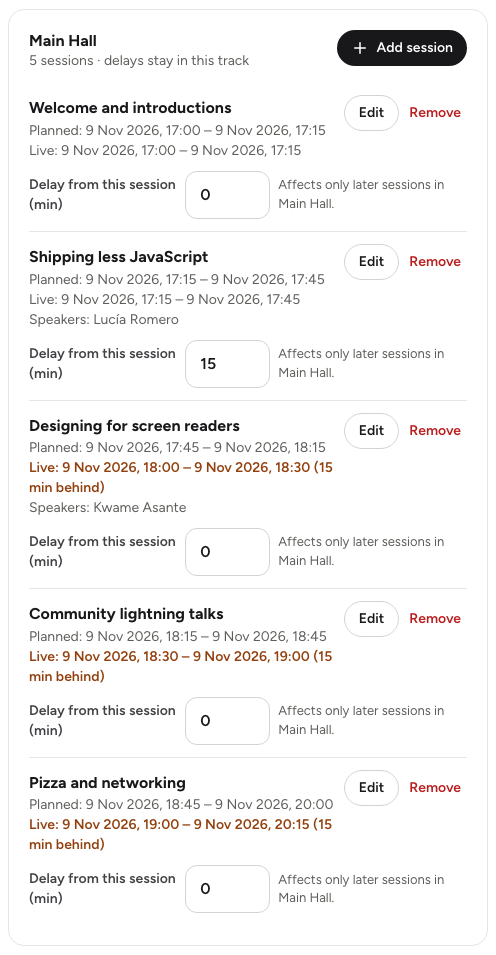
Delays are whole minutes from 0 to 1,440 (one day). You can't enter a negative delay to bring sessions forward; reduce or clear an earlier delay instead.
Clearing a delayLink to this section
Set Delay from this session (min) back to 0 and leave the box. Later sessions return to their planned times, less any other delays still in place.
What guests seeLink to this section
- The Programme page shows the live times, and each delayed session carries a note such as Running 15 min late.
- The event page's Schedule section shows the live times.
- Each session's own page shows its live time, and its "next in this track" and "also at" lists use live times too.
Guests see the new times the next time they open or refresh a page. Yuyu doesn't email anyone about a delay. If you want to tell people, send a quick message from the Emails tab; the Live update on the day template is written for this. See Emailing your guests.
Good to knowLink to this section
- Add the delay to a Published session. Public times are worked out from published sessions only, so a delay on a Draft or Hidden session doesn't move anything guests can see.
- A delay never changes the session's planned times. If the day is permanently rearranged, edit the sessions instead with Edit and new Planned start and Planned end times; see Building the programme.
- Overlap warnings in the schedule are based on planned times, not live ones.