Judges, rubric and scoring
Invite judges, build the rubric, and score projects.
Judging in Yuyu works with a rubric: a short list of criteria, each with a weight and a maximum score. Judges score every criterion for a project, add an optional private comment, and submit their review. Yuyu turns the reviews into a ranked list you use to choose winners.
Inviting judgesLink to this section
Judges are co-organisers with the Judge permission. Invite them from the event's Settings tab like any other co-organiser, and tick Judge. See Event co-organisers.
A co-organiser who only has Judge sees the scoring workspace and nothing else when they open the event: no guest list, answers, emails, check-in or settings.
Judging → Judges lists your Invited judges with how many reviews each has submitted, then Organisers who can also judge: the organisation's owners and admins, who can score from the Score section.
Building the rubricLink to this section
- Open the Judging tab and choose Setup.
- In the Rubric card, choose Add criterion.
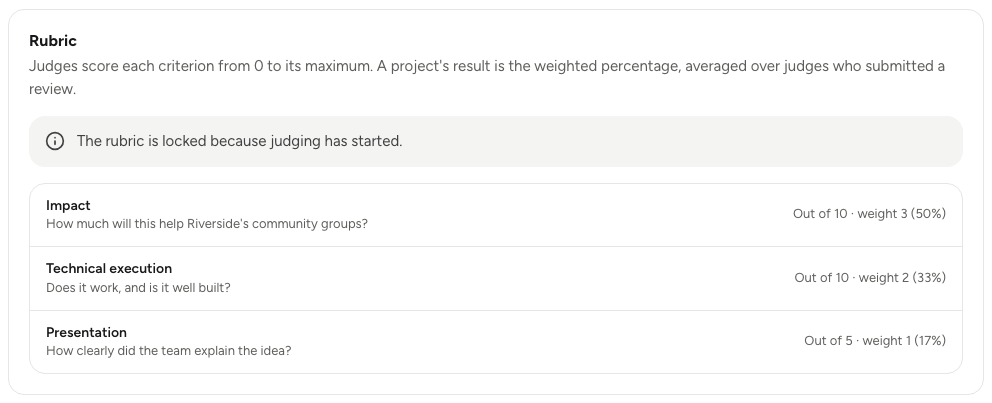
- Fill in the Name (for example "Impact" or "Technical execution") and What judges look for.
- Set the Weight, from 1 to 10. A criterion with weight 4 counts twice as much as one with weight 2.
- Set the Maximum score, from 1 to 10.
- Choose Save criterion. Repeat for each criterion.
A rubric can have up to 20 criteria. Each one shows its share of the total weight as a percentage. Use the arrows to reorder them.
The rubric is locked once judging opens, so every judge scores against the same criteria. If you spot a mistake straight after opening, choose Back to not started on the Judging card, fix the rubric, and open again. That only works while judging is open and before any judge has saved a score.
Choosing which projects judges seeLink to this section
In Setup, under Which projects judges see:
- All judges see all submissions: every judge can score every submitted project. Good for small events.
- Only assigned submissions: each judge sees only the projects assigned to them. Good when there are too many projects for everyone to review. See Assigning judges and tracking progress.
Choose Save settings after changing it.
Opening judgingLink to this section
- Make sure submissions are on and the rubric has at least one criterion.
- In Setup, find the Judging card and choose Open judging.
- Confirm. Yuyu tells you how many submitted projects judges can start scoring.
Judges can read submitted projects before you open judging, but they can't score them.
Scoring a projectLink to this section
Judges open the event from their dashboard. Owners and admins use Judging → Score.
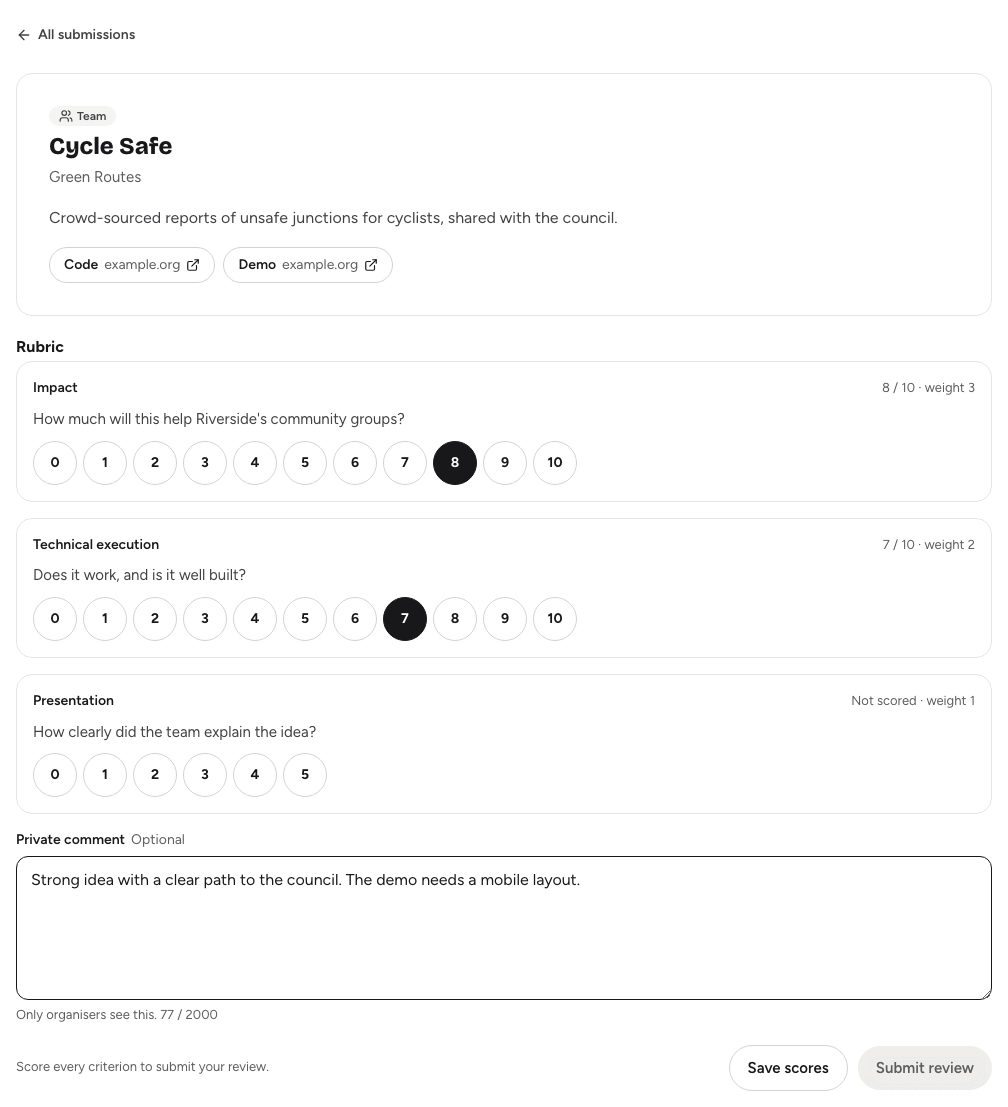
- Choose Score next project. Yuyu opens a project you've started, or else the one with the fewest reviews so far. Or pick one from the list.
- Read the summary and open the links to the code, demo or video.
- Give a score for each criterion, from 0 to its maximum.
- Add a Private comment if you like. Only organisers see it, never the entrants.
- Choose Save scores to come back later, or Submit review once every criterion is scored.
After you submit, the next project opens by itself. Choose Back to list or All submissions to return to the list. When there's nothing left, you'll see "You're all caught up".
The list has filters for All, To score, In progress and Reviewed, and a search by project or team name. While judging is open, you can change a submitted review and choose Update review.
Only submitted reviews count. Saved scores that haven't been submitted are left out of the results.
Closing judgingLink to this section
When the judges are done, go to Setup and choose Close judging…, then confirm. Scores are frozen, and you can pick winners and publish the results. See Awards and results.
Need to let a late judge finish? Choose Reopen judging. You can do this until results are published.
How the score is worked outLink to this section
For each judge, Yuyu works out a weighted percentage: every criterion's score as a share of its maximum, weighted by the criterion's weight. A project's result is the average of those percentages across the judges who submitted a review, rounded to one decimal place. Projects with the same score share a rank.
If some judges mark much harder than others, you can rank by an adjusted score instead. See Awards and results.